Work

The Oculus Kiosk

The Oculus Kiosk

How did we streamline the check-in process at ophthalmology clinics for the visually impaired?

DISCLAIMER: All Oculus Kiosk concepts, research, and drawings are owned by Camille Dorset (MS, Applied Health Informatics at Fordham University). The project was developed collaboratively with John Chelsom (Seven Informatics Ltd.) and myself as a contract UX Designer.

Overview

TYPE OF WORK

Product Design, End-to-End UX Process, Service Design, Content Design, Research Paper

TIMELINE

July 2023 — April 2025 (1 year, 9 months)

TEAM

1x Lead UX Designer (me)

1x Research Project Lead / Developer

1x Subject Matter Expert (MOA)

LOCATION

Victoria, Canada 🇨🇦

Oxford, UK 🇬🇧

New York City, USA 🇺🇸

TOOLS

Figma / FigJam

Zoom

KEY WORDS

Product Design, Content Design, Digital Health, Kiosk / Mobile UX, Accessibility (a11y), Research Paper

READ FULL CASE STUDY

The Evolution of Medical Records: From Clay to Code

Origins: The earliest health records came from ancient Mesopotamia where clay tablets or ṭuppu (𒁾𒉺) were used to record patients' health details. Physicians or asû (𒀀𒋢𒌑) and healers or āšipu (𒀀𒋢𒁉𒌑) would use the sakikkû, or a diagnostic medical manual, to understand how to treat their patient. The sakikkû (𒊕𒄭𒅕) would serve as their clinical decision support system at the time.

Today: In today's digital world, health records come in the shape of electronic health records (EHRs). But another problem arises from this new medium: how can we make these health records easy-to-use for a broad range of patients and interoperable across different clinics?

Defining the problem

THE PROBLEM

Healthcare is inaccessible, and ophthalmology clinics are no exception

Read the anecdote below from the MOA I worked with:

“There was a patient who came in to our clinic this week who tried to complete our new patient packet, but they had left rushed out of the clinic [crying] as they were frustrated they were unable to fill out the form. The patient happened to be fingerless.”


— Medical Office Assistant

This story was a prime example showcasing various bottlenecks in the current process including:

🎯👈 Motor Barriers

Patients who had a physical impairment often struggled with the manual paperwork due to struggles with writing or holding the pen and paper.

🔍 Hard-to-See, Hard-to-Use

With over 30% of Americans affected by visual impairment, many ophthalmology patients struggle with small, dense text on paper forms.

🤯 High Cognitive Load

Due to various factors including medical jargon in long symptom lists, text-heavy forms, and confusing legal disclaimers, the current forms are hard to understand.

MY TASK

From Concept Sketches to an Accessible, Patient-First Prototype

Seven Informatics Ltd., a research consultancy, recently explored integrating cityEHR into ophthalmology triage. A student researcher, also an SME and former ophthalmology MOA, created proof-of-concept sketches based on clinic care pathways. My task was to refine these sketches into an accessible and UX-driven prototype that would accommodate ophthalmology patients of all backgrounds.

Original concept drawings of the Oculus Kiosk created by Camille Dorset

Original concept drawings of the Oculus Kiosk created by Camille Dorset

The Solution

Design Decisions

IMPROVEMENT 01

Large Target Sizes

Inspired by an SME’s anecdote of a patient without fingers, the Oculus Kiosk prioritizes larger touch targets for accessibility. Digitizing intake removes the struggle of holding a pencil for physically or cognitively impaired patients. With oversized buttons exceeding WCAG 2.1’s 44x44 px standard, even those with limited dexterity can navigate the interface with ease.

IMPROVEMENT 02

Intuitive Iconography

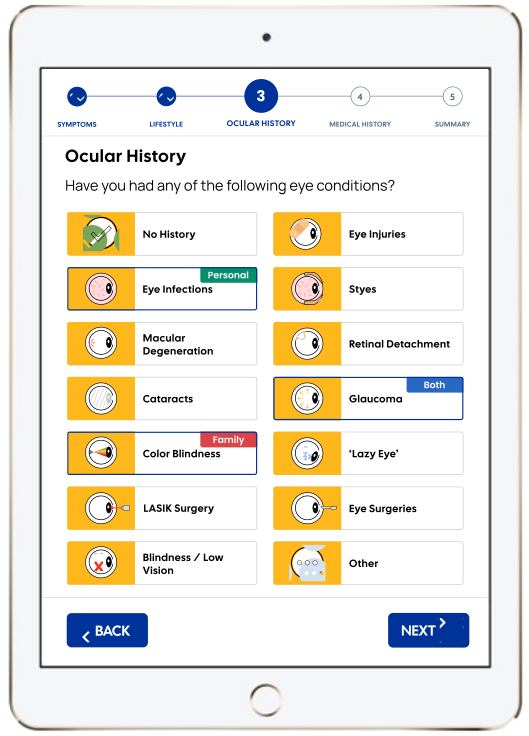
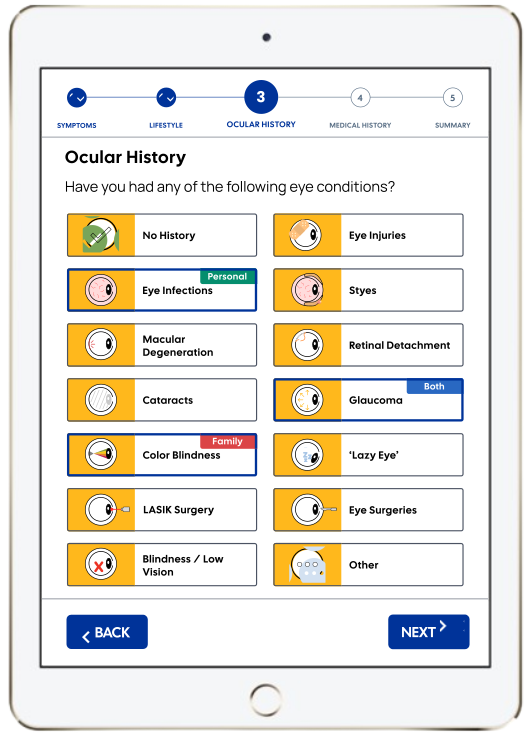
An SME from a New York City ophthalmology clinic stressed the need for clear visuals to simplify complex medical jargon. Since most patients struggle with clinical terms, large images and icons aid recognition, especially for the visually impaired. Condition names were simplified, and visuals were designed for key medical conditions.


Usability testing showed 80% of participants used icons as helpful secondary aids, using them to confirm their choice after first referring to the text. Icons were placed on a dark yellow (#FFB81C) background for contrast, avoiding red-green combinations to accommodate patients with deuteranopia.

IMPROVEMENT 03

High Contrast UI

To enhance accessibility, I tested the Oculus Kiosk’s color palette with a color-blind peer and incorporated their feedback. I also referenced WCAG 2.1 contrast guidelines to ensure high-contrast colors that accommodate all users, including those with visual impairments like color blindness.

IMPROVEMENT 04

Readability

Sans-Serif. I used two sans-serif fonts—Cal Sans for titles and buttons, and Manrope for labels and body text—to enhance readability by eliminating extra strokes.

Text Size. Larger, bolded text with wider line spacing improves glanceability and lexical decision-making (NNG). Following APH ConnectCenter guidelines, text is at least 18pt (24px) for low-vision users.

Sentence Case. Using sentence case improves legibility by creating distinct word shapes, aiding those with visual impairments. Unlike title case, which appears block-like, sentence case enhances readability—an approach supported by Google's Material Design.

IMPROVEMENT 05

Ergonomic Hardware Experience

40% of participants preferred scanning their health insurance card over manual entry, improving accessibility for physically impaired patients. This feature requires integrating a card scanner into the kiosk or tablet, along with an intuitive onboarding experience to guide users through the process.

The instructional graphics should be self-explanatory and provide users with system feedback and progress of their card scan. There are 3 distinct phases with 2 edge case for statuses:


  1. Enter your card

  2. Scanning your card

  3. Remove your card

  4. Scan success

  5. Card error

Results & Next Steps

RESULTS

Impact

🚀 0->1 Project

Delivered a development-ready prototype where research, exploration, design, and testing/validation was all completed in 5 iterations. Next step: implementation!

👁️ a11y-Friendly Icons

Introduced 25+ icons and illustrations to help patients understand ophthalmic, medical, and pharmaceutical terminology using an accessible color palette.

👍 Improved Usability

Through usability tests with 5 visually-impaired participants, we achieved a SUS score of 87.5; a 17% improvement from a SUS score of 75 from previous iterations.

📑 Published Paper

Co-authored a research paper on ontology-based kiosks for ophthalmology clinics published by Springer Nature in the HIMS 2024 conference proceedings.

Sprint II - IV Prototype

Sprint V Prototype

RESULTS

Published Conference Paper!

Our conference paper 'A Health Records Kiosk, Using an Ontology-Based Information Architecture' (J. Chelsom, C. Dorset, W. Lee, 2025) was published by Springer Nature as part of the book 'Health Informatics and Medical Systems and Biomedical Engineering'; a collection of papers submitted for the HIMS 2024 Conference.

VIEW PAPER

FUTURE

Next Steps

Develop the Oculus Kiosk

The Oculus Kiosk is currently being developed and it will soon be prepared for deployment to real-world clinics. The Oculus Kiosk uses the cityEHR created by Seven Informatics Limited as a backbone for its back-end.

Deploy to a Real-World Clinic

Once the Oculus Kiosk is fully developed, we have plans of piloting it in either the New York clinic our SME works at or in Oxford, close to where Seven Informatics Limited operates. Though it was originally designed for an American healthcare system, depending on where we decide to ship, we will make slight adjustments to the workflow.

Pilot Testing

Once we have implemented and deployed the Oculus Kiosk to a real-world clinic, we plan on doing a second round of testing with both patients along with care providers and MOAs and continue to iterate and improve the user experience.

The mobile version is currently under 🚧 construction 🚧

Meanwhile, please feel free to enjoy my portfolio on desktop.

Contact

Let's work together! Get in touch through one of these links:

© William Lee 2024

2025

William Lee